
Wappx connects to your own WhatsApp Business Account (WABA) through Meta’s official Cloud API. You need admin access to your business in Meta Business Suite.
⚠️ A number that is currently used in the WhatsApp or WhatsApp Business app must be removed from the app (or migrated) before it can be registered on the Cloud API.
Part 1 — in Meta (get the three values)
- At developers.facebook.com → My Apps → Create app, choose type Business and add the WhatsApp product.
- In WhatsApp → API Setup, add your business phone number and verify it with the SMS or voice code.
- In business.facebook.com → Settings → Users → System users, create an admin system user and assign it your app and your WhatsApp account with full control.
- Click Generate new token for that system user, choose your app, tick
whatsapp_business_messagingandwhatsapp_business_management, and set expiry to Never.
Part 2 — in Wappx
1 The red numbers in each screenshot match the numbered steps below it. Click a screenshot to open it full size.
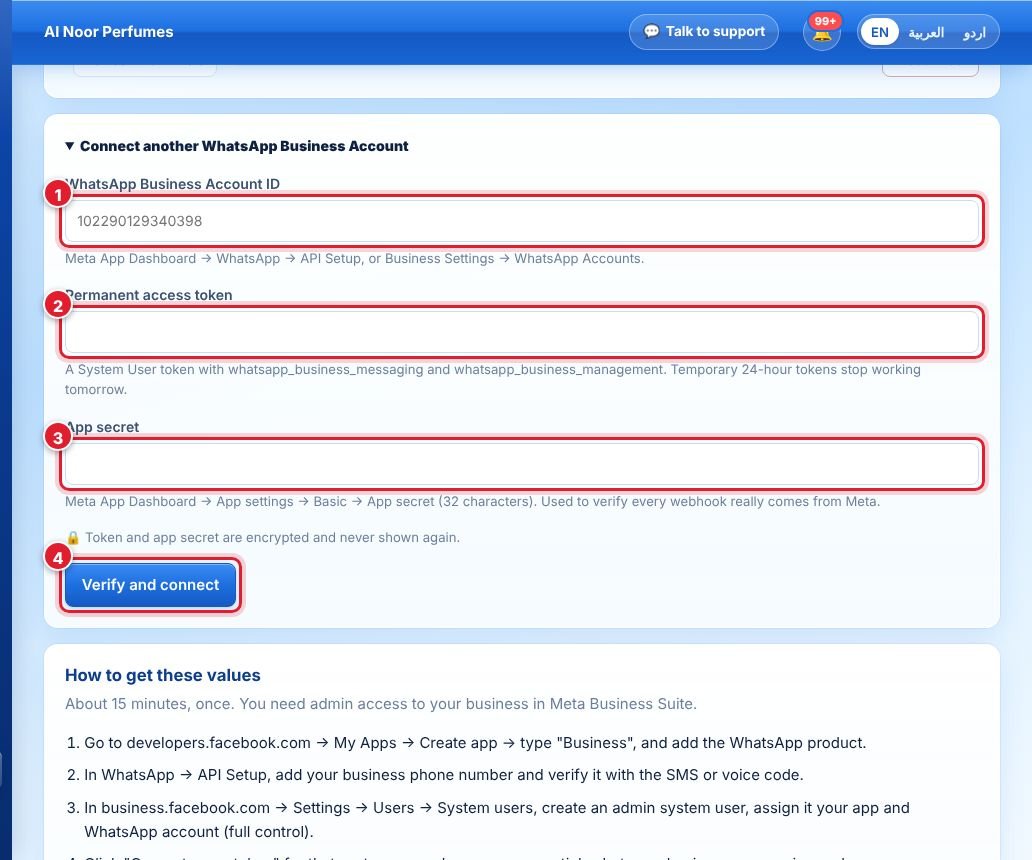
- Open WhatsApp in the left menu and paste your WhatsApp Business Account ID.
- Paste the permanent access token from Part 1, step 4.
- Paste your app’s App secret (Meta App Dashboard → App settings → Basic).
- Click Verify and connect. Wappx checks the values with Meta and lists your numbers.
Then set up the webhook — see Set up the webhook — register the number with a 6-digit PIN if Wappx asks, and send yourself a test message.
Your token and app secret are stored encrypted and are never shown again. Meta charges message fees to the payment method on your WhatsApp account — Wappx adds 0% markup.
جواب نہیں ملا؟
ہماری ٹیم سے پوچھیں