
All conversations with your customers appear in Inbox.
1 The red numbers in each screenshot match the numbered steps below it. Click a screenshot to open it full size.
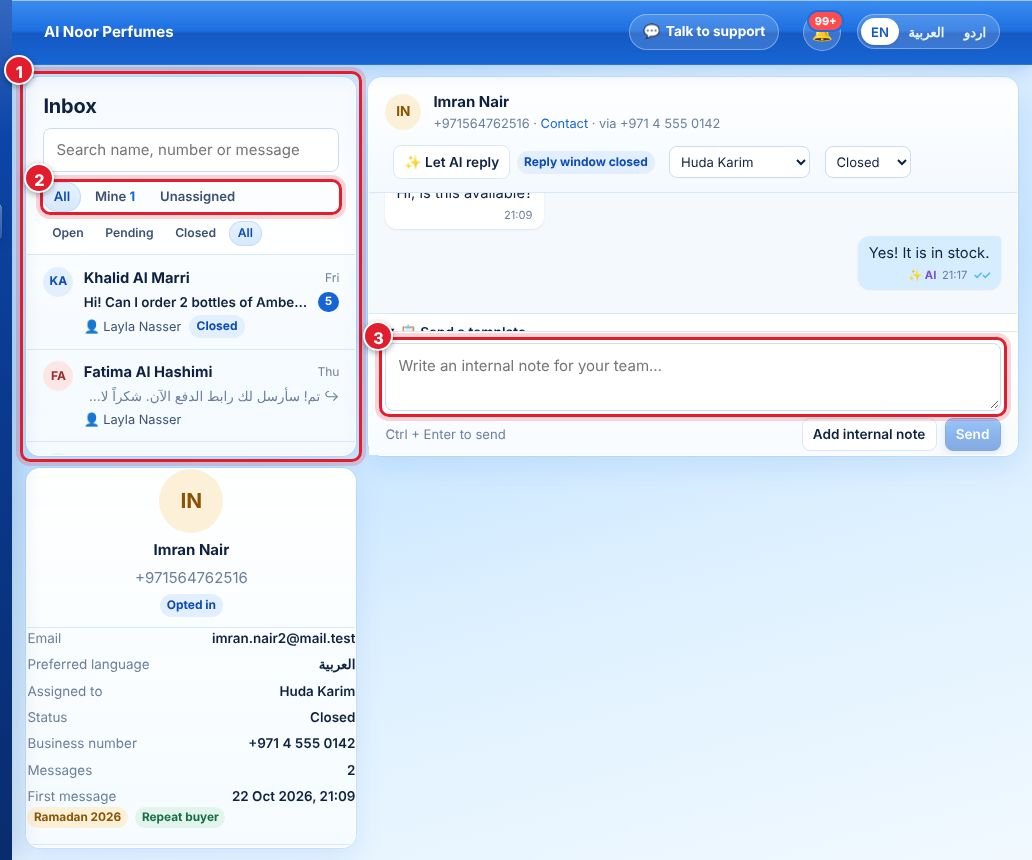
- The chat list shows every conversation. Use the search box to find a name, number or message, and click a chat to open it.
- Filters: All / Mine / Unassigned, and Open / Pending / Closed.
- Write your reply in the message box. Switch to Internal note to write something only your team sees. Ctrl + Enter sends.
- Assign a chat to yourself or a colleague from the drop-down at the top of the chat. The person is notified.
- Status: mark chats Pending while you wait for something, and Closed when done.
- ✨ Let AI reply asks the AI assistant to answer this chat.
The 24-hour window
WhatsApp lets you send free-form replies only within 24 hours of the customer’s last message. Wappx shows the time left at the top of the chat. When the window closes, use Send a template to re-open the conversation; internal notes always work.
Didn’t find your answer?
Ask our team