
1 The red numbers in each screenshot match the numbered steps below it. Click a screenshot to open it full size.
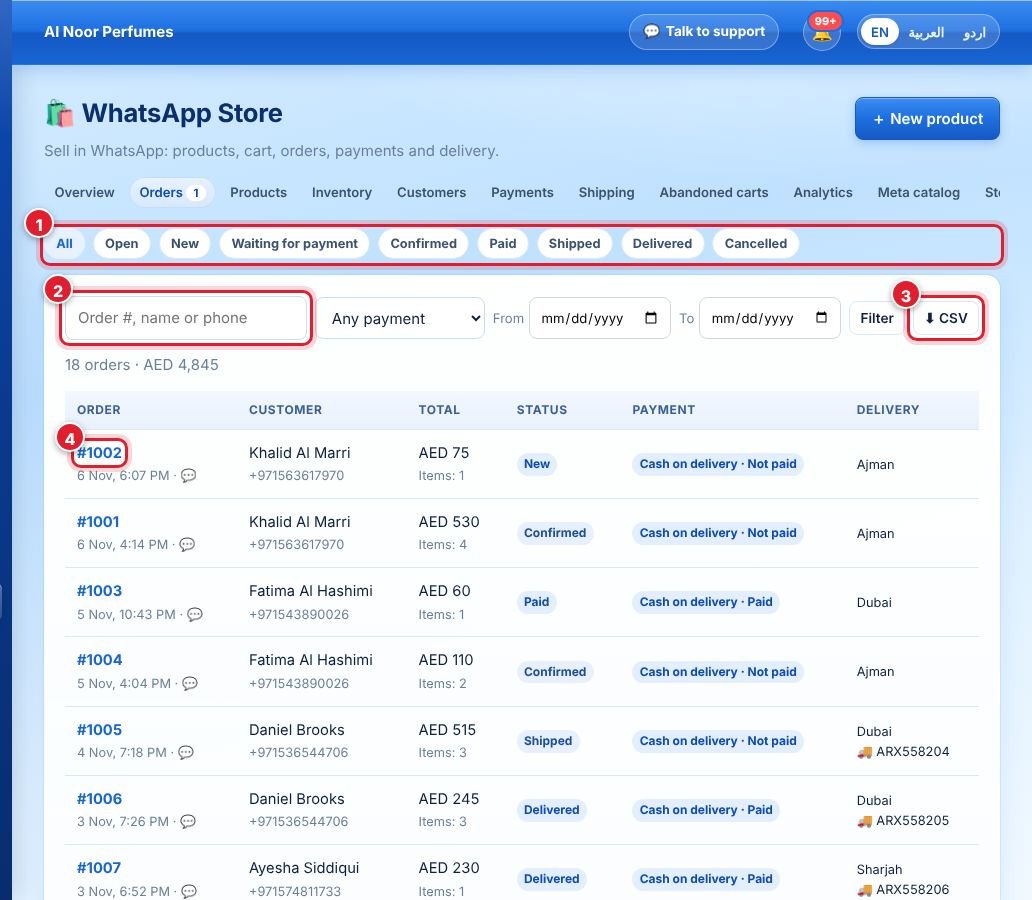
- Filter by status: New, Confirmed, Shipped, Delivered, Cancelled.
- Search by order number, name or phone.
- Download the list as CSV.
- Click an order number to open it.
One order

- The progress bar: New → Confirmed → Shipped → Delivered.
- Click Confirm order when you accept it.
- When it leaves, type the tracking number and link (optional) and click Mark shipped.
- For cash on delivery, click Mark as paid once you have the money.
- Cancel order if needed — stock goes back automatically.
- Customer details: name, WhatsApp, delivery address, payment and where the order came from. Open chat jumps to their conversation.
You get a notification for every new order. Each step is sent to the customer in WhatsApp (while their 24-hour chat window is open).
لم تجد إجابتك؟
اسأل فريقنا